
How Much Does AI Automation Cost in Australia?
“It depends” is the honest answer to almost every pricing question in this industry — and it’s also the answer that leaves business owners no closer to actually budgeting for a project. You’re trying to work out whether AI automation is a $500-a-month decision or a $50,000 one, and most articles on this topic dodge the question with vague ranges that could mean anything.
This guide exists to fix that. We’re going to break down AI automation cost Australia businesses can realistically expect to pay in 2026, by project type, by business size, and by the specific factors that push a quote up or down — with real figures, not vague “contact us for pricing” deflections.
At Digitechzo, we quote and deliver AI automation projects for Australian businesses every month, and we’ve seen exactly where costs blow out and exactly where businesses overpay for capability they don’t need. This guide walks through real pricing by project type, the specific factors that move a quote, a transparent breakdown of what you’re actually paying for, and the questions to ask any provider before you sign — so you can budget accurately instead of guessing.
Quick Answer
“AI automation costs in Australia typically range from $300–$3,000 a month for off-the-shelf tools and simple chatbot or workflow automations, up to $15,000–$150,000+ for custom-built systems with deep integrations. Most small-to-medium Australian businesses spend between $5,000 and $40,000 on an initial automation project, with ongoing monthly costs of $200–$2,000 for hosting, model usage, and maintenance.”
AI Automation Cost in Australia: The Real Numbers by Project Type
Rather than one vague range, here’s what Australian businesses are actually paying across the most common categories of AI automation, based on typical market pricing as of 2026.
| Project Type | Typical Upfront Cost (AUD) | Typical Ongoing Cost (AUD/mo) |
| Off-the-shelf AI chatbot (no-code) | $1,000 – $5,000 | $100 – $500 |
| Custom AI chatbot with integrations | $15,000 – $50,000 | $300 – $1,500 |
| Workflow automation (single process) | $3,000 – $15,000 | $50 – $400 |
| Workflow automation (multi-department) | $20,000 – $70,000 | $300 – $1,200 |
| AI lead scoring and nurture system | $5,000 – $25,000 | $200 – $1,000 |
| AI appointment booking/scheduling | $1,500 – $10,000 | $50 – $500 |
| Custom AI integration (modern systems) | $8,000 – $30,000 | $100 – $600 |
| Custom AI integration (legacy systems) | $20,000 – $60,000+ | $200 – $1,000 |
| Enterprise multi-system AI platform | $80,000 – $250,000+ | $1,500 – $8,000+ |
These figures reflect typical Australian market pricing for properly scoped projects delivered by experienced providers; very low quotes often signal a template-based build with limited customisation, while very high quotes should be scrutinised for what’s actually included.
What’s Actually Included in an AI Automation Quote?
A common source of budget shock is discovering, mid-project, that the original quote didn’t cover something the business assumed was included. Here’s what a properly itemised quote should break down.
Upfront/One-Time Costs
- Discovery and scoping — process mapping, requirements gathering, and feasibility assessment before any building begins.
- Design and development — the actual build of the automation, chatbot, or integration.
- Data preparation — cleaning, structuring, or consolidating data the AI needs to work from — frequently underestimated.
- Testing and quality assurance — validating the system works correctly, including edge cases, before launch.
- Training and documentation — ensuring your team can actually use and maintain what’s been built.
Ongoing/Recurring Costs
- Software or platform subscription fees — licensing for the tools or platforms the automation runs on.
- AI model/API usage costs — usage-based fees for LLM API calls, which scale with how much the system is actually used.
- Hosting and infrastructure — server or cloud costs for running custom-built systems.
- Maintenance and support — ongoing updates, monitoring, and fixes as your business and source systems evolve.
The Factors That Actually Drive Your Quote Up or Down
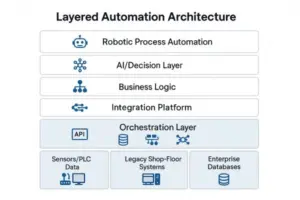
Two businesses requesting “a chatbot” can receive quotes that differ by a factor of ten, because the price has almost nothing to do with the word “chatbot” and everything to do with these underlying factors.
1. Number and Complexity of Integrations
Connecting to one modern, well-documented system costs far less than connecting to five systems, some of which are legacy platforms without APIs. Each integration point adds its own development, testing, and ongoing maintenance burden.
2. Data Readiness
Businesses with clean, structured, accessible data pay significantly less than those whose data is scattered across spreadsheets, inconsistent formats, or systems that don’t talk to each other — because someone has to fix that before any AI work can reliably begin.
3. Customisation vs Template Configuration
A chatbot configured from an existing template with your branding and FAQs costs a fraction of one built with custom conversation logic, unique business rules, and bespoke integrations.
4. Compliance and Security Requirements
Projects touching health information, financial data, or government systems typically require additional security review, audit logging, and documentation — all of which add cost beyond what a standard commercial project requires.
5. Volume and Scale
A system handling 50 conversations a month costs less to run than one handling 50,000, both in infrastructure and in the AI model usage fees that scale with activity.
6. Provider Type and Experience
Freelancers and small agencies typically charge less than established consultancies, but the gap often reflects differences in project management rigor, testing thoroughness, and post-launch support — worth weighing against the headline price difference.
DIY vs Off-the-Shelf vs Custom: A Cost Comparison Over Time
The cheapest option upfront isn’t always the cheapest option over a year or two, particularly as usage scales. Here’s how the three paths typically compare.
| Path | Year 1 Cost (AUD) | Best For | Risk |
| DIY no-code (Zapier, Make) | $1,200 – $6,000 | Simple, low-volume automations | Breaks down as complexity grows |
| Off-the-shelf AI tool | $3,000 – $20,000 | Standard use cases, fast launch | Per-seat/usage fees compound with scale |
| Custom-built solution | $15,000 – $80,000 | Unique processes, proprietary data, scale | Higher upfront risk if poorly scoped |
Real Cost Example: What a Small Business Actually Paid
A 20-person Sydney-based logistics company budgeted for AI-driven workflow automation to handle delivery confirmation and invoicing. The initial quote covered discovery, integration with their existing freight and accounting software, and testing — totalling $24,000 upfront, with an ongoing cost of roughly $380 a month covering hosting and API usage.
What wasn’t in the original budget, but emerged during the data audit phase, was three weeks of additional data cleaning work because years of inconsistent manual entry had created duplicate and conflicting records — adding roughly $4,500 to the project. This is a common and predictable cost that a thorough provider should flag during scoping rather than discovering mid-build, and it’s worth asking about explicitly before signing any quote.
How to Calculate Your Expected ROI Before You Commit
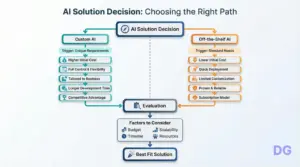
A cost figure means little without comparing it against what the automation actually saves. Use this simple framework before committing to any project.
- Calculate current time cost — multiply the hours per week currently spent on the manual task by the fully-loaded hourly cost of the staff doing it.
- Estimate time saved post-automation — a realistic estimate is 60–85% of current time for well-suited repetitive tasks, not 100%; some human oversight usually remains.
- Calculate annual savings — multiply the weekly time saved by the hourly cost, then by 52 weeks.
- Compare against total first-year cost — upfront cost plus twelve months of ongoing fees, to find your break-even point.
As a worked example: if a task currently costs $600 a week in staff time, and automation removes 70% of that ($420 a week, or roughly $21,800 a year), a $15,000 upfront automation project with $300 a month in ongoing costs ($3,600 a year, totalling $18,600 in year one) pays for itself within the first year and continues delivering savings well beyond it.
Common Mistakes Businesses Make When Budgeting for AI Automation
- Comparing quotes without comparing scope — a $3,000 quote and a $20,000 quote for “the same chatbot” are rarely actually comparable once you check what’s included.
- Ignoring ongoing costs in the budget — focusing only on the upfront fee while underestimating monthly API, hosting, and maintenance costs that accumulate over a year.
- Not budgeting for data cleanup — this is consistently the most underestimated cost component in AI automation projects.
- Choosing the cheapest provider without checking experience — a low quote that doesn’t include proper testing or documentation often costs more in the long run through rework or failures.
- Skipping the ROI calculation entirely — committing to a project based on the technology’s appeal rather than a clear-eyed comparison against current costs.
Expert Tips for Getting the Best Value on AI Automation
- Ask for an itemised quote, not a lump sum — a breakdown by discovery, build, data work, testing, and training reveals exactly what you’re paying for and where costs could be trimmed.
- Start with a pilot scope, not the full vision — a smaller first project reduces financial risk while proving the value before a larger investment.
- Get a written estimate for ongoing costs, not just the build — ask specifically what API usage, hosting, and support will cost in a typical month at your expected volume.
- Request references from similarly sized businesses — a provider’s enterprise case study tells you little about what a project will cost and deliver for a 15-person business.
- Clarify what happens if you want to leave — understand data portability and ownership terms before committing, so you’re never locked into a provider by default.
Frequently Asked Questions
How much does AI automation cost for a small business in Australia?
Small Australian businesses typically spend between $1,000 and $25,000 upfront on a first AI automation project, depending on whether it’s an off-the-shelf tool configuration or a more customised build, plus $100–$600 a month in ongoing hosting and usage costs.
Is AI automation a one-time cost or an ongoing expense?
Both. There’s typically a one-time or project-based cost to design and build the automation, plus an ongoing monthly cost covering software subscriptions, AI model usage fees, hosting, and maintenance — budgeting for both is essential to avoid underestimating the true annual cost.
Why do AI automation quotes vary so much between providers?
Quotes vary primarily based on scope (template configuration versus fully custom build), the number and complexity of system integrations, data readiness, and the provider’s experience level — not simply because providers are charging arbitrarily different amounts for the same work.
What’s a realistic ROI timeline for AI automation?
Most well-scoped AI automation projects for Australian SMEs reach break-even within six to fourteen months, depending on the size of the upfront investment and how much manual time the automation actually removes. Simpler, lower-cost automations often pay for themselves faster than large, complex custom builds.
Are there hidden costs I should ask about before signing a quote?
Yes — the most commonly overlooked costs are data cleaning and preparation, ongoing AI model usage fees that scale with volume, and post-launch support or maintenance. Ask any provider to explicitly confirm whether these are included in the quoted figure or billed separately.
Conclusion: Budget for the Real Cost, Not Just the Headline Number
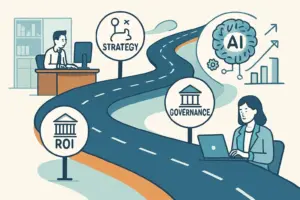
The honest answer to “how much does AI automation cost” is that it depends heavily on your specific systems, data, and goals — but that doesn’t mean you have to budget blind. Understanding the real cost drivers, what should be itemised in any quote, and how to calculate your own ROI puts you in a far stronger position than comparing vague headline numbers between providers.
If you want an accurate, itemised cost estimate for your specific business rather than a generic range, Digitechzo provides a free scoping consultation that maps your actual processes and systems before quoting — so you know exactly what you’re paying for and what return to expect. Get in touch to get real numbers, not guesswork.
About The Author