
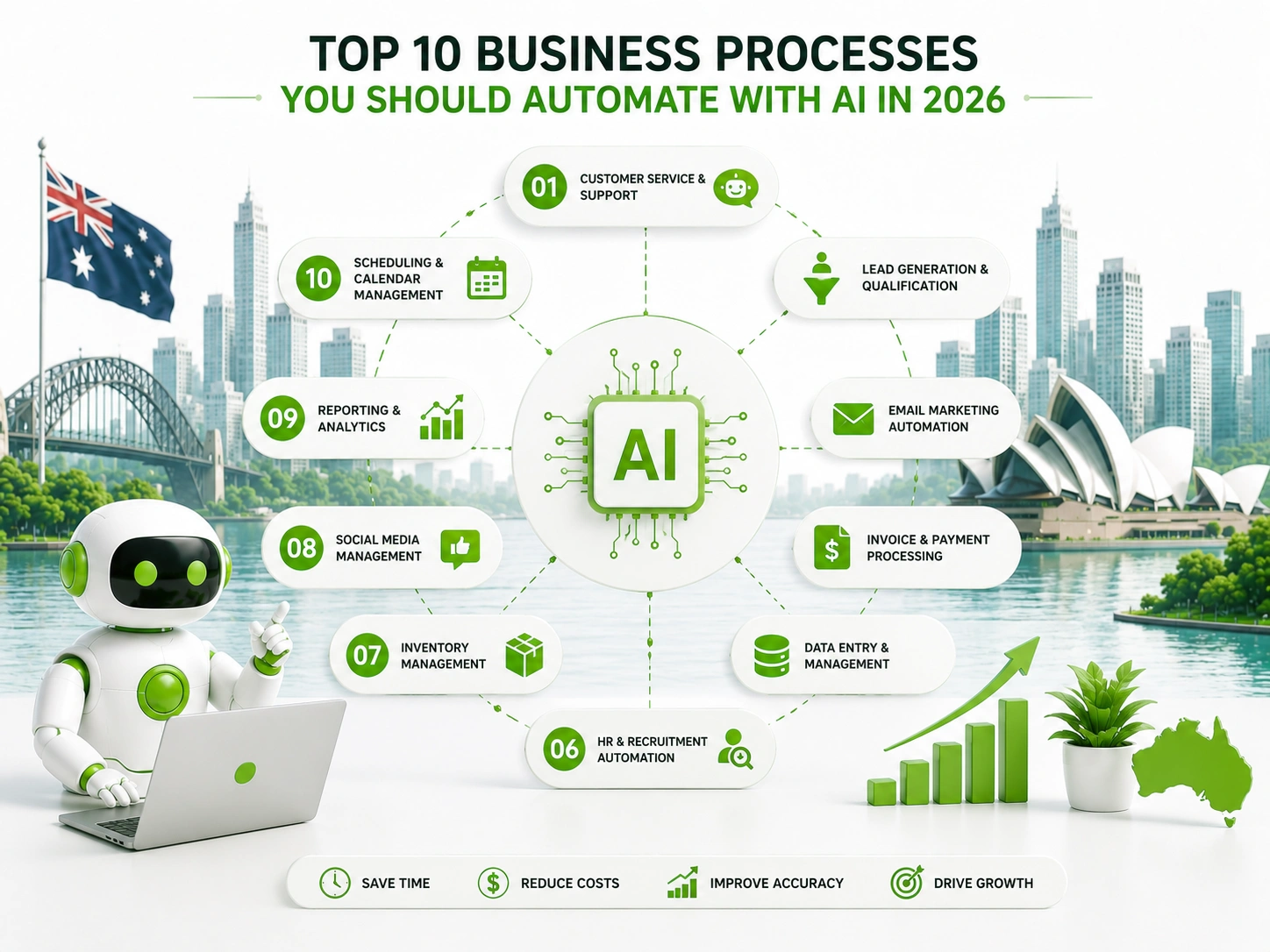
Top 10 Business Processes to Automate with AI in 2026
Ask any business owner where their team’s time goes and you’ll get the same answer: meetings, follow-ups, data entry, approvals, and reports. None of it is inherently valuable work — most of it is the scaffolding around valuable work, the administrative load that has to happen before anyone actually serves a client, closes a deal, or makes a decision. Business process automation exists specifically to strip that scaffolding away, replacing manual, repetitive steps with systems that run themselves.
In 2026, the case for business process automation has never been stronger, or more accessible. AI tools capable of understanding language, predicting outcomes, and acting on data have moved from enterprise-only pricing into the range of a small business budget. The challenge is no longer access — it’s knowing which processes are worth automating first, and why.
At Digitechzo, we help Australian businesses identify exactly this — mapping where time is actually lost before recommending a single tool. This guide covers the ten business processes where AI automation consistently delivers the fastest, most measurable return: what makes each one suitable for automation, what the AI actually handles, a realistic example, and the tools typically used to build it.
Quick Answer
“The ten business processes most worth automating with AI in 2026 are: customer service and support, lead generation and qualification, appointment scheduling, invoicing and payment follow-up, employee onboarding, reporting and data aggregation, document processing, HR and leave management, social media and marketing content, and IT helpdesk and internal support. Each delivers the highest return when the process is high-volume, rule-driven, and currently consuming significant staff time.”
At a Glance: The 10 Processes Ranked by Return Speed
| Process | Typical Time Saved/Week | Implementation Complexity | ROI Speed |
| Customer service and support | 5–20 hrs | Low–Medium | Very fast (weeks) |
| Lead generation and qualification | 3–10 hrs | Low–Medium | Very fast (weeks) |
| Appointment scheduling | 2–8 hrs | Low | Very fast (weeks) |
| Invoicing and payment follow-up | 3–10 hrs | Low–Medium | Fast (1–2 months) |
| Employee onboarding | 4–12 hrs | Medium | Fast (1–3 months) |
| Reporting and data aggregation | 3–15 hrs | Medium | Fast (1–3 months) |
| Document processing | 4–18 hrs | Medium–High | Moderate (2–4 months) |
| HR and leave management | 2–6 hrs | Low–Medium | Fast (1–2 months) |
| Social media and marketing content | 3–10 hrs | Low | Fast (1–2 months) |
| IT helpdesk and internal support | 3–12 hrs | Medium | Moderate (2–4 months) |
#1 — Customer Service and Support
Why automate it?
Customer enquiries follow predictable patterns. Across most service businesses, 60–70% of incoming support volume clusters around the same handful of questions: order status, billing queries, account access, basic troubleshooting, and opening hours. Business process automation handles exactly this category, around the clock, without a person needing to type each reply.
What business process automation handles:
- Answering FAQs and product/service questions via AI chatbot
- Triaging and routing tickets to the right team or escalation path automatically
- Sending automated order updates and status notifications
- Collecting initial information before a human joins a complex conversation
Real-world example:
A Melbourne e-commerce company receiving 1,200 support tickets a month found that 65% were repetitive questions about delivery timeframes and returns. After deploying an AI chatbot connected to their order management system, those 780 tickets resolved automatically — freeing the two-person support team to focus entirely on the remaining 420 genuinely complex cases.
Tools commonly used: Intercom, Zendesk AI, Freshdesk, custom LLM-powered chatbot
#2 — Lead Generation and Qualification
Why automate it?
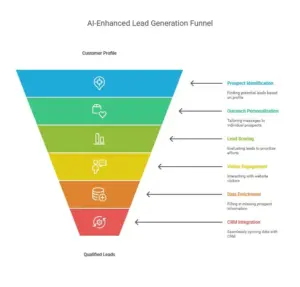
Every hour a sales rep spends manually qualifying leads that will never buy is an hour not spent on the ones that will. Business process automation handles the first-contact qualification layer — asking the right questions, scoring the response, and routing only the promising leads to a human — so the sales team focuses its time where conversion is actually likely.
What business process automation handles:
- AI chat widgets that qualify website visitors in real time with guided questions
- Predictive lead scoring based on behavioural and firmographic signals
- Automatic data enrichment to fill in company and contact details
- Personalised follow-up sequences triggered by lead score and behaviour
Real-world example:
A Brisbane financial advisory firm was spending roughly 12 hours a week per sales rep manually following up and qualifying website enquiries. After implementing AI lead scoring and automated follow-up sequences, the team’s manual qualification time dropped to under three hours a week, with higher-quality conversations as the remaining work.
Tools commonly used: HubSpot, Pipedrive, ActiveCampaign, Salesforce Einstein, custom scoring models
#3 — Appointment Scheduling and No-Show Management
Why automate it?
Business process automation is particularly effective for scheduling because the logic is explicit: check availability, confirm the booking, send reminders at the right time, and fill cancellations from a waitlist. All of it is predictable, rule-driven, and currently consuming hours of reception and admin time across every service-based business.
What business process automation handles:
- 24/7 self-service booking without a human checking the calendar
- AI-timed reminders matched to the response patterns of your specific client base
- No-show risk scoring to target interventions where they’re actually needed
- Automatic waitlist offers when cancellations occur
Real-world example:
A physiotherapy clinic with six practitioners was experiencing a 19% no-show rate. Adding AI-driven reminder timing — a personalised SMS five days out and a confirmation request the morning before — reduced no-shows to under 9% within six weeks, recovering close to three sessions per practitioner per week.
Tools commonly used: Cliniko, HotDoc, Calendly, Acuity Scheduling, custom scheduling integrations
#4 — Invoicing, Collections, and Payment Follow-Up
Why automate it?
Late payments are one of the most predictable and automatable problems in business. Business process automation handles the full collection cycle — generating invoices when a trigger fires, sending reminders on a tested schedule, escalating to a more direct message after a threshold is crossed, and alerting a human only when an account genuinely needs personal attention.
What business process automation handles:
- Auto-generating invoices when a job is marked complete or a project milestone is hit
- Scheduled payment reminder sequences that escalate in tone based on how overdue the account is
- Automatic reconciliation between payments received and invoices in accounting software
- Flagging accounts for human follow-up only when automated reminders have been exhausted
Real-world example:
A Sydney IT services firm spending four hours a week manually chasing overdue invoices implemented automated payment reminders through their accounting platform. Within three months, average debtor days dropped from 47 to 29, while the four hours of weekly admin was entirely eliminated.
Tools commonly used: Xero, MYOB, QuickBooks, Stripe, GoCardless, Make/Zapier automations
#5 — Employee Onboarding
Why automate it?
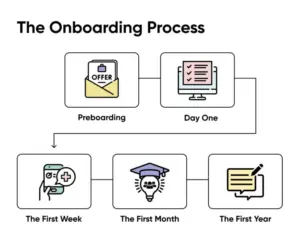
The average employee onboarding process involves the same set of tasks for every new hire: sending contracts, collecting documentation, setting up accounts, assigning training modules, and scheduling first-week check-ins. Business process automation handles every repeatable step in this sequence, ensuring nothing is forgotten and freeing HR to focus on the welcome experience rather than the paperwork.
What business process automation handles:
- Automatically triggering a document collection sequence when a hire is confirmed in the HRIS
- Provisioning software accounts and access permissions without an IT ticket
- Assigning and scheduling mandatory training in the correct sequence
- Sending manager reminders for check-in conversations at scheduled intervals
Real-world example:
A 60-person professional services firm reduced their average onboarding time from 14 days to five days by automating document collection, system provisioning, and training assignment. The HR team went from spending a full day per new hire on administrative steps to spending less than an hour, focused on the conversation rather than the checklist.
Tools commonly used: BambooHR, Rippling, WorkflowMax, Zapier, Microsoft Power Automate
#6 — Reporting and Data Aggregation
Why automate it?
In most businesses, the weekly or monthly report is assembled by a person pulling data from four different systems, reformatting it into a spreadsheet, and building charts — every single time. Business process automation replaces this recurring task with a live dashboard or an automatically generated report, drawn from the same source systems but without the manual rebuild.
What business process automation handles:
- Pulling data automatically from sales, operations, and finance platforms into a single view
- Generating formatted reports on a schedule and distributing them by email
- Alerting the right people when a metric falls outside a defined threshold
- Maintaining a live dashboard that updates in real time rather than weekly
Real-world example:
A logistics company whose operations manager spent five hours every Monday building a weekly performance report replaced the process with an automated dashboard connected directly to their fleet management and accounting systems. The report now updates continuously, and the five hours redirect into analysing what the data shows rather than assembling it.
Tools commonly used: Power BI, Looker Studio, Tableau, Metabase, Zapier, Google Data Studio
#7 — Document Processing and Data Extraction
Why automate it?
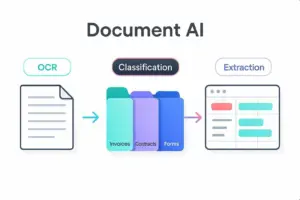
Manually reading invoices, contracts, or application forms and entering their contents into a system is time-consuming, error-prone, and entirely automatable. AI document processing reads unstructured documents — PDFs, scanned pages, email attachments — extracts the relevant fields, and populates downstream systems without a person touching a keyboard.
What business process automation handles:
- Extracting line items, totals, and supplier details from supplier invoices automatically
- Processing application forms and populating CRM or database records from the extracted data
- Reading contracts for key dates, clauses, and obligations and logging them systematically
- Classifying and routing incoming documents to the correct team or workflow
Real-world example:
An accounting firm processing 400+ supplier invoices monthly for clients was manually keying invoice data into their accounting platform. After implementing AI document extraction, invoice processing time dropped from eight minutes per invoice to under ninety seconds, eliminating close to 40 hours of monthly data entry across the team.
Tools commonly used: Rossum, Dext, AWS Textract, Google Document AI, Microsoft Azure Form Recogniser
#8 — HR Administration and Leave Management
Why automate it?
Leave requests, timesheet approvals, policy questions, and performance review scheduling follow highly predictable workflows that are ideal targets for business process automation. Removing these tasks from HR’s daily queue returns meaningful time to higher-value work like talent development, culture, and compliance.
What business process automation handles:
- Routing leave requests to the correct approver and confirming outcomes automatically
- Answering common HR policy questions via an internal AI assistant
- Sending performance review reminders to managers and employees at scheduled intervals
- Automatically updating leave balances and payroll systems when approvals are confirmed
Real-world example:
A 120-person business found HR was handling over 60 routine enquiries per week about leave balances, payroll dates, and policy questions. Deploying an internal AI HR assistant reduced that query volume by 70%, with the remaining questions being genuinely complex cases that benefited from direct HR attention.
Tools commonly used: Employment Hero, BambooHR, Rippling, Microsoft Copilot, custom internal chatbots
#9 — Social Media and Marketing Content Production
Why automate it?
Content production for social media, email newsletters, and basic marketing copy is one of the highest time-to-value processes a business can automate in 2026. AI tools now handle first-draft generation, caption writing, image brief creation, and scheduling — not replacing strategy or creativity, but removing the production hours that previously consumed marketing teams’ days.
What business process automation handles:
- Generating first-draft social captions from a brief or content pillar
- Repurposing long-form content (blog posts, videos) into social snippets and email summaries
- Scheduling content across channels automatically once approved
- Analysing post performance and surfacing content themes that drive the most engagement
Real-world example:
A six-person professional services firm was spending 10+ hours a week across two team members producing social media content. After implementing an AI-assisted content workflow — brief in, draft out, human review, schedule — production time dropped to under three hours a week while posting frequency increased from three times to five times per week.
Tools commonly used: Jasper, Buffer, Hootsuite, Lately, Make/Zapier with GPT API, Later
#10 — IT Helpdesk and Internal Support
Why automate it?
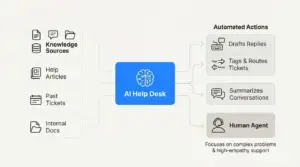
Most internal IT helpdesk tickets follow the same patterns: password resets, software access requests, device setup questions, and basic troubleshooting. Business process automation handles the repetitive tier-one load so IT staff spend their time on infrastructure, security, and genuinely complex technical issues rather than resetting the same ten passwords a week.
What business process automation handles:
- Automatically resolving common requests like password resets and access provisioning
- Triaging and routing tickets to the correct team member based on category and urgency
- Answering technical FAQs through an internal AI assistant
- Escalating tickets that require human attention with full context already captured
Real-world example:
A 200-person organisation found that 55% of all IT helpdesk tickets were password resets, VPN access issues, and basic software questions. Automating these categories reduced the IT team’s reactive ticket volume by more than half, freeing two engineers to focus on the security infrastructure project that had been delayed for months.
Tools commonly used: Freshservice, ServiceNow, Jira Service Management, Moveworks, Microsoft Copilot
What Makes a Business Process Suitable for AI Automation?
Not every process belongs on this list, and understanding why the ones above were chosen helps you evaluate your own situation rather than blindly following a template.
- High volume, low variation — processes that repeat frequently with predictable inputs and outputs are far easier and safer to automate than rare, high-stakes edge cases.
- Clear trigger and outcome — business process automation works best when there’s a definable starting event (invoice received, lead submitted) and a definable end state (invoice keyed, lead scored).
- Current significant time cost — the ROI calculation only works if the process is actually consuming meaningful time today; automating something that takes 20 minutes a week rarely justifies the investment.
- Limited need for human judgement — processes requiring creativity, relationship sensitivity, or contextual reasoning should still involve humans; automation handles the steps on either side.
Common Mistakes Businesses Make When Choosing Processes to Automate
- Starting with the most complex, not the most frequent — ambitious first automations on difficult processes fail more often than simple ones on high-volume tasks.
- Automating a broken process without fixing it first — business process automation makes a bad workflow faster, not better; fix the logic before automating it.
- Ignoring the human handoff design — every automated process needs a clear point where a human takes over for edge cases, or the system fails the cases that need it most.
- Not measuring baseline before automating — without knowing how much time the process currently takes, it’s impossible to know whether the automation actually worked.
- Treating automation as a one-time project — processes evolve, and automations need occasional updates to remain accurate and effective as the business changes.
Expert Tips for Prioritising Your First Automation
- Build a simple time-log for one week — ask each team member to track repetitive tasks they perform daily or weekly; the results consistently reveal the highest-value automation targets.
- Rank candidates by time-times-frequency — multiply minutes per occurrence by weekly occurrences to find the real time cost, then rank candidates by this number rather than how painful the task feels.
- Start with one owner per automation — assign a specific staff member to own each automation’s performance, so maintenance and improvement have a home when something needs adjusting.
- Run a four-week pilot before full rollout — test on a subset of real volume before replacing the existing process entirely; catching issues small is far cheaper than catching them at full scale.
- Document the manual process before you build the automation — the documentation becomes both the build brief and the fallback if the automation ever needs to be paused.
Frequently Asked Questions
What is business process automation?
Business process automation is the use of software and artificial intelligence to perform repetitive, rule-driven business tasks — such as data entry, scheduling, invoicing, or customer follow-up — without requiring manual effort for each occurrence, freeing staff to focus on higher-value work.
Which business process should I automate first?
Start with the process that combines the highest weekly time cost with the clearest, most predictable trigger and outcome — typically customer service enquiries, invoicing follow-up, or appointment scheduling for most small to medium businesses. Avoid starting with your most complex or highest-stakes process, regardless of how painful it feels.
How long does business process automation take to implement?
Simple automations using existing platforms (invoice reminders, appointment scheduling) can be live in two to four weeks. Custom automations involving multiple system integrations typically take six to fourteen weeks, including mapping, building, testing, and a monitored launch period.
Does business process automation require technical expertise?
For simple, off-the-shelf automations, no — many tools are designed for non-technical users. For automations involving multiple integrated systems, legacy software, or custom logic, an experienced automation consultant or developer is usually needed to build it properly and avoid errors in live data.
Can business process automation replace employees?
In most deployments, business process automation redirects staff time from repetitive administrative work toward higher-value tasks — client service, problem-solving, growth activities — rather than eliminating roles. Where it does reduce headcount need, it typically happens through natural attrition or business growth being handled without proportional hiring, not abrupt redundancy.
Conclusion: The Right Process, Automated Well, Compounds Over Time

The businesses pulling ahead in 2026 aren’t necessarily the ones with the biggest automation budgets — they’re the ones who identified one high-volume, high-time-cost process, automated it properly, and used the result to build momentum for the next one. Business process automation rewards this approach: each win proves the value, builds internal trust, and funds the case for the next project.
If you’re not sure which of these ten processes would deliver the fastest return for your specific business, Digitechzo runs a practical one-session process audit that maps where your team’s time actually goes and prioritises automation opportunities by expected return. Get in touch to start with a clear, ranked plan — not a generic list.
About The Author